Your team does not need another tool to check. It needs fewer enquiries left waiting, less information copied between systems and more time for work that requires judgement. That is a useful starting point for AI in an Australian small business: identify a specific operational problem before choosing the technology.
This guide explains how to select a first use case, decide whether AI is actually needed and run a controlled pilot. It is designed for service businesses that already use email, documents, spreadsheets or a CRM and want a practical next step.
PRACTICAL GUIDE / AI FOR BUSINESS
Start with one recurring task. Keep human review in the pilot, and measure the full workflow rather than the speed of a demo.
Start with the task, not the AI product
“We need to use AI” is not a project brief. “Our operations coordinator spends Friday afternoon turning approved meeting notes into draft client updates” is much closer. It identifies the work, the person doing it and a result you can review.
Write down one recurring problem using this structure: When this happens, this person needs this information to produce this result. Then ask what makes the task slow. Missing information, unclear ownership and inconsistent templates may need a process fix before they need AI.
The National AI Centre's business preparation guidance also starts with understanding processes and defining the intended outcome. A clearer workflow makes any later technology decision easier to assess.
Four realistic starting points for a service business
| Use case | AI-assisted step | Human check |
|---|---|---|
| Meeting summaries | Draft actions from approved notes | Check names, dates and commitments. |
| Incoming enquiries | Suggest a category or urgency | Keep a named owner and a fallback queue. |
| Document review | Propose fields from source files | Compare every accepted field with its source. |
| Internal knowledge | Find approved procedures | Return source links and respect access permissions. |
These are possible applications, not promises that a particular product will perform them reliably. Suitability depends on your documents, systems, access permissions and the consequences of a mistake.
Check whether simpler automation would do the job
AI is useful when a task involves interpreting varied language or information. It is not necessary for every repetitive task. If a website enquiry simply needs to create a CRM record and assign a follow-up task, a form integration and a clear rule may be enough.
A useful distinction is: rules move known information; AI helps interpret information that varies. A combined workflow might use AI to suggest an enquiry category, a fixed rule to assign the right team and a person to approve the response. For more examples, read our guide to business process automation workflows.
Use a five-question readiness check
- Is the task clearly defined? Name its trigger, inputs, output and owner. If different team members describe different processes, resolve that first.
- Can someone judge a good result? Keep a small set of representative examples and define what an acceptable output looks like.
- Is the information suitable for the chosen tool? Check access, retention, provider terms and what your organisation permits staff to share.
- Can mistakes be contained? Start with drafts or recommendations, not unrestricted permission to send messages, change records or approve transactions.
- Can you measure the whole workflow? Include preparation, checking and correction time, not just the time the tool takes to respond.
Where customer or confidential information is involved, assess the proposed setup before connecting it. The Australian Signals Directorate's guidance on using AI securely is a useful starting point for reviewing provider practices, data handling and oversight.
Run a small pilot with a clear decision at the end
A four-week structure can help organise a modest pilot; it is a planning example, not a delivery guarantee.
- Week 1 — Understand the baseline. Record how the task is done, how often it occurs, typical handling time and common errors. Agree what information can be used.
- Week 2 — Test representative examples. Include incomplete inputs and unusual cases, not just easy demonstrations. Compare results with the agreed standard.
- Week 3 — Try a limited live workflow. Give a small group clear instructions, an escalation path and a manual fallback. Keep review steps in place.
- Week 4 — Decide. Continue, revise or stop based on measured results, operating effort and the team's experience.
Measure useful capacity, not impressive demos
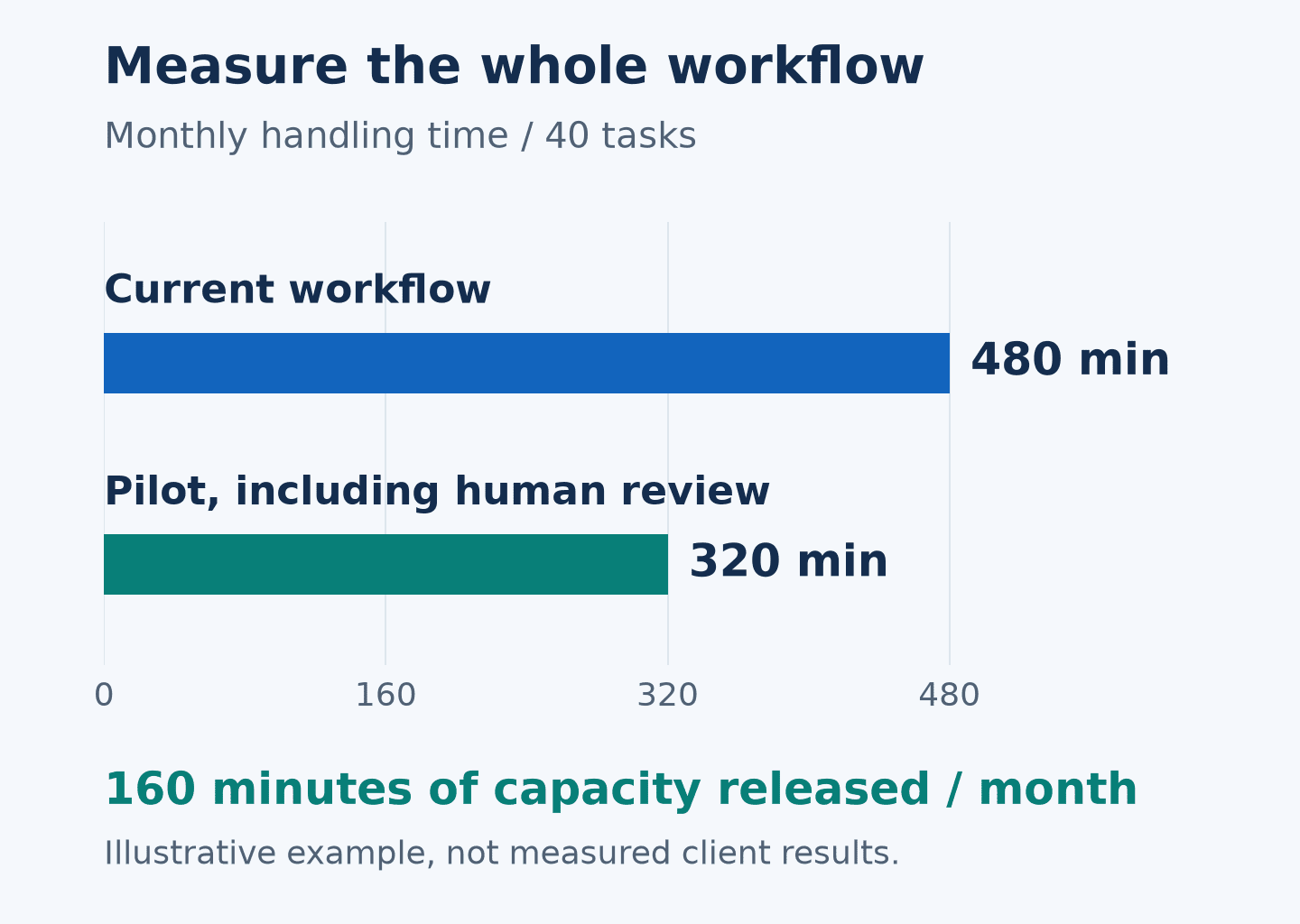
Suppose a task happens 40 times each month and takes 12 minutes. If the pilot reduces total handling time, including review, to eight minutes, the illustrative saving is 160 minutes a month: 40 × four minutes. That is capacity released, not automatically a cash saving or extra revenue.
Compare that benefit with setup, subscriptions, integration, training and ongoing support. Also track correction rates and missed cases. A faster workflow that creates more rework may not be an improvement.
Common questions about AI for small business
Do we need to replace our existing software?
Not necessarily. Check what your current applications can support before adding a separate system. Integration quality and the way staff work matter as much as the feature list.
Should our first project be an autonomous AI agent?
Not by default. Start with the level of access and independence the task actually needs. A draft for review can be a more manageable starting point than an agent that makes changes across several systems.
What should we bring to an initial discussion?
Bring one recurring problem, the systems involved, an approximate task volume and an example with sensitive information removed. That is enough to start a useful conversation about feasibility.
Find a practical starting point with KIYO Group
KIYO Group is a Sydney-based consultancy working with Australian businesses on AI, CRM and business automation. Explore our AI consulting services, or book a complimentary 15-minute discovery call to discuss one workflow and the outcome you want to improve.
Worked example: monthly capacity
160 minutes of capacity released per month. Illustrative calculation: 40 × 12 minutes versus 40 × 8 minutes. These are example assumptions, not KIYO client results or guaranteed savings.