The most useful business process automation often starts between the systems you already have. A website receives an enquiry, an inbox receives a document and someone has to move the work forward. When that handover is unclear, customers wait and staff repeat work.
Below are seven workflows an Australian service business can assess. Each example includes a trigger, a possible automated action and a check that keeps the process manageable. They are starting points to adapt, not a recommendation to automate every step at once.
WORKFLOW GUIDE / BUSINESS AUTOMATION
Automate one dependable handover first. Define the trigger, owner, exception route and measure of success before connecting more systems.
What is business process automation?
Business process automation uses software to carry out defined steps in a workflow, such as creating a task when an enquiry arrives or notifying a delivery team when an approved project is ready. A dependable workflow also needs an owner, exception handling and a way to see whether it worked.
Rules-based automation suits predictable conditions. AI can help interpret varied text or documents, but its output may need review. An effective design separates those jobs instead of using AI for tasks that a straightforward rule can handle.
| Workflow | Trigger | Control to retain |
|---|---|---|
| Enquiry routing | A new enquiry arrives | Duplicate check + fallback owner |
| Proposal follow-up | A proposal is recorded as sent | Stop or update tasks when the outcome changes |
| Client onboarding | Engagement approval is confirmed | Verify approval; prevent duplicate projects |
| Document requests | A checklist item becomes due | Separate receipt, review and acceptance |
| Internal approvals | A current version is ready | Check reviewer access and version |
| Delivery handover | Agreed handover criteria are met | Delivery team accepts or returns it |
| Operations review | The scheduled review runs | Show missing data and link to source records |
1. Route new enquiries to the right person
Trigger: a customer submits a website form or another approved lead source sends an enquiry.
Possible workflow: create or update the CRM record, retain the source, assign an owner using agreed service or territory rules and create a first-action task. Use a fallback queue when the information is incomplete or no rule matches.
Check: verify duplicate handling and what happens when the assigned person is unavailable. Track unassigned enquiries and elapsed time to a recorded first action. An automated acknowledgement alone does not prove that someone owns the enquiry.
2. Create follow-up tasks after a proposal
Trigger: a proposal is actually sent and its status is recorded.
Possible workflow: schedule an internal follow-up task with the proposal link, customer context and responsible salesperson. Cancel or update the task when the opportunity is won, lost or placed on hold.
Check: prevent repeat tasks when a record is edited without a meaningful status change. If customer messages are included, agree templates, timing, consent requirements and stop conditions separately. Start with staff reminders when the communication rules are not yet clear.
3. Prepare a consistent client onboarding handover
Trigger: a defined approval or signed-engagement condition has been met.
Possible workflow: prepare a project from an agreed template, assign the coordinator and produce an internal handover checklist with scope, contacts, deliverables and the next action.
Check: do not assume that a sales-stage change proves a contract is signed or payment has cleared. Read those facts from the system responsible for them, or require a manual confirmation. Make repeated events safe so the same customer does not receive duplicate projects.
4. Track document requests without repeated inbox searches
Trigger: an onboarding or delivery step requires a defined set of documents.
Possible workflow: create a request checklist, record what has arrived and notify the responsible person when something is missing or ready for review. Keep the approved document location linked to the customer or project record.
Check: a file arriving is not the same as a document being accepted. Keep receipt, review and acceptance as distinct states. Decide who can access files and what should happen if an upload is unreadable or relates to the wrong customer.
5. Route approvals with enough context to decide
Trigger: a quote, scope change or other internal request is ready for an authorised reviewer.
Possible workflow: send a request containing the current version, relevant background and a clear approve-or-return action. Record the decision and notify the person responsible for the next step.
Check: confirm that only the correct roles can approve, that an old approval cannot silently apply to a changed version and that unanswered requests have an escalation path. Avoid treating delivery of a notification as an approval.
6. Make sales-to-delivery handovers visible
Trigger: an opportunity meets the business's agreed handover criteria.
Possible workflow: prepare a delivery record or handover task containing agreed scope, customer commitments, dependencies and the named owner. Let the delivery team accept the handover or return it for missing information.
Check: define what “ready” means before building the integration. Track incomplete handovers and the time to acceptance, not just the number of records created. If the same team already uses a good manual checklist, start by automating its routing rather than redesigning everything.
7. Assemble a useful weekly operations review
Trigger: a scheduled review time in the business's agreed time zone.
Possible workflow: gather overdue tasks, unassigned enquiries, stalled opportunities and failed integrations into a concise review list. Link each item to the underlying record and an owner.
Check: label the reporting period and data source. A missing connection should appear as missing data, not as zero work or a successful result. If AI drafts a narrative summary, require source links and review any claims before sharing it.
Choose the first workflow using three tests
- Value: does the current process create enough repeated effort, delay or missed work to justify a change?
- Clarity: can you name the trigger, owner, required information and intended result?
- Recoverability: can the team detect a failure, stop the automation and finish the task manually?
Pick one workflow that passes all three. Document a normal case, a duplicate event, missing information and a failed connection. Test with controlled records before allowing customer-facing messages or wider system changes.
If CRM records are the foundation, use our CRM implementation checklist first. If the difficult part is interpreting information, our AI starting guide can help you assess whether an AI-assisted step is appropriate.
Measure the end-to-end result
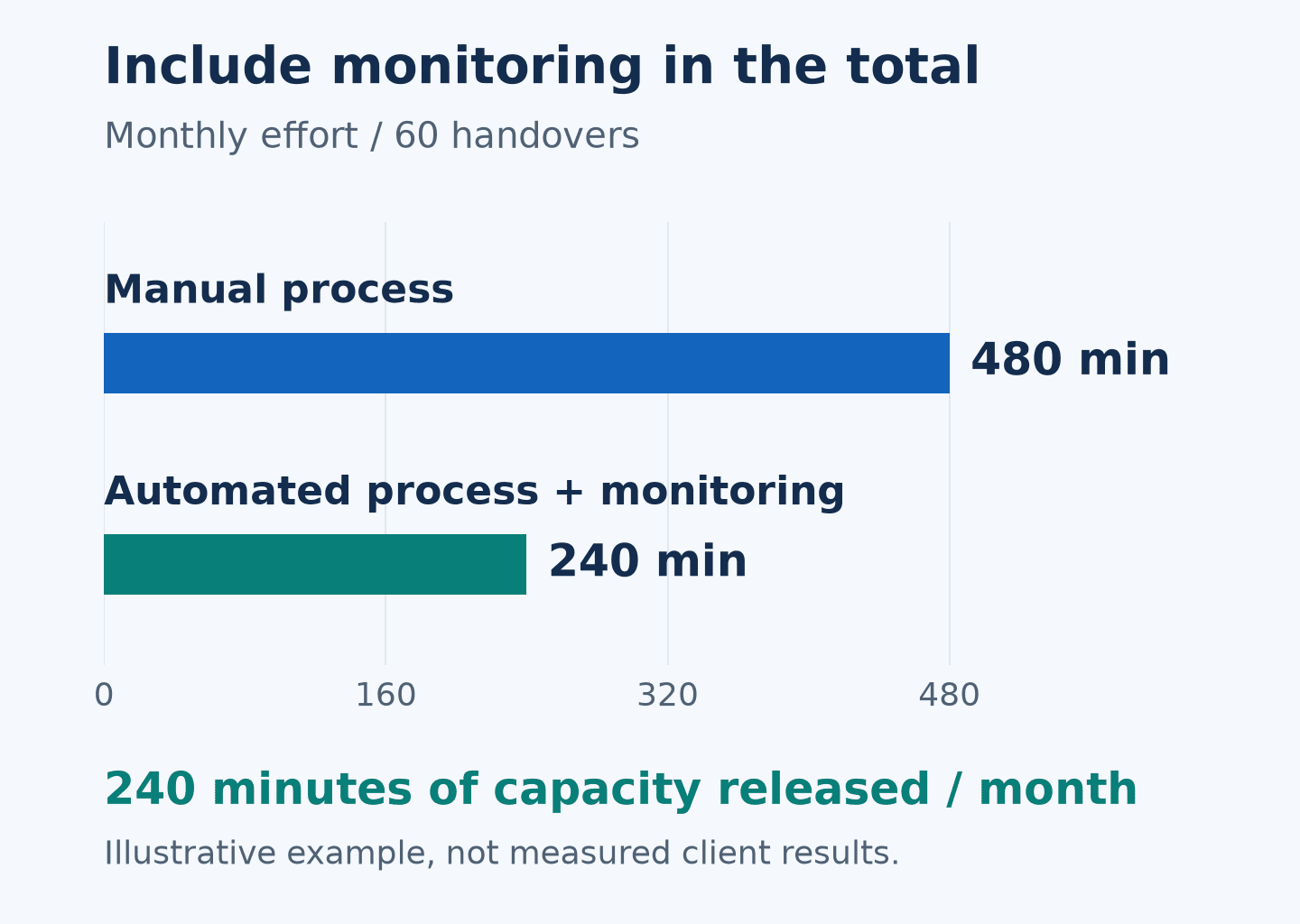
Record a baseline before making changes. Useful measures include total handling time, missed handovers, corrections and the number of exceptions that need manual work. Include time spent monitoring and maintaining the workflow.
Automating a task does not guarantee cost savings. The aim is to produce a more dependable result with effort and running costs that make sense for the business. Keep a named owner and review the workflow when systems or operating rules change.
Discuss your next automation step
KIYO Group works with Australian businesses to assess workflows and connect CRM and operational systems. Explore our business automation and CRM services, or book a complimentary 15-minute discovery call. Bring one recurring handover problem and the systems involved so the discussion can focus on a practical next step.
Worked example: automation effort
Four hours of capacity released per month in this example. Manual: 60 × 8 minutes = 480. Pilot: 60 × 3 minutes, including review, + 60 minutes of monitoring = 240. Illustrative assumptions only; not measured customer results or a savings promise.